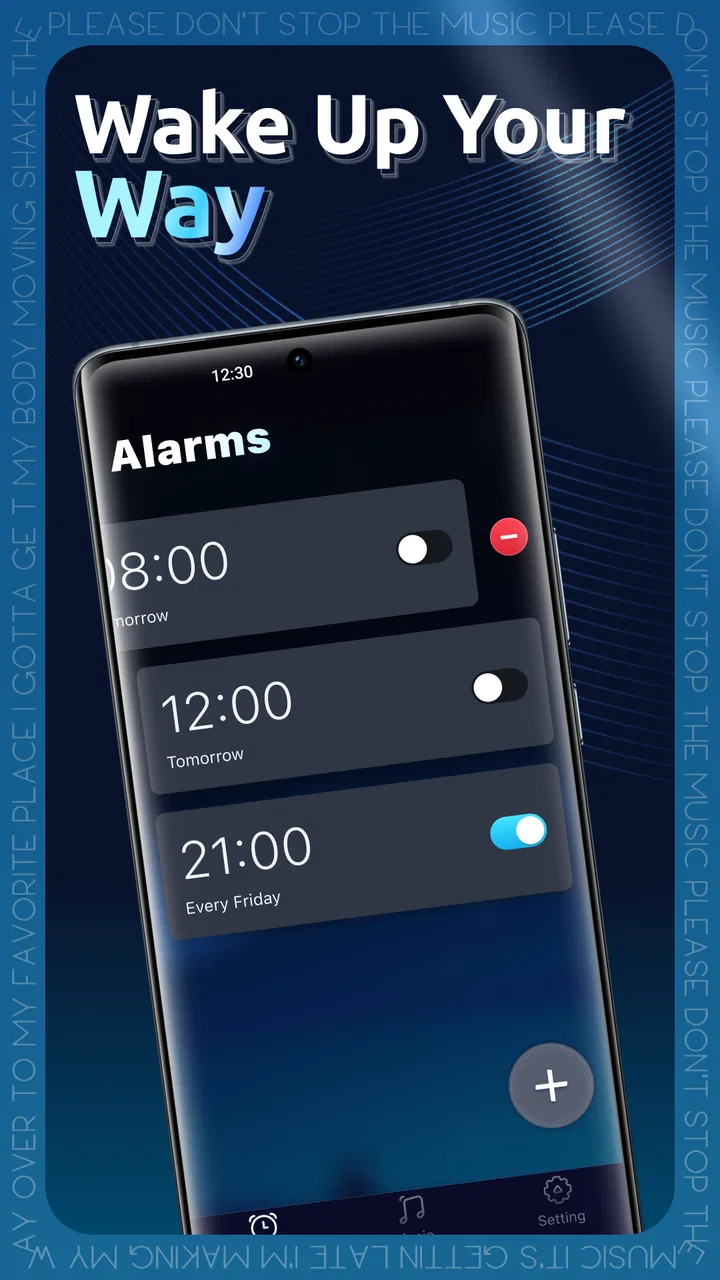
Geta Alarm Music Player
- 4.6
- Rating
- 500.00K
- Installs
- Free
- Price

 Analysis by App-foxy
I treated Geta Alarm Music Player as a small creative tool rather than just another alarm clock. Its idea is simple: turn the moment of waking into a personal audio choice instead of forcing you to accept the same harsh tone every morning. In practice, that makes the app most interesting for people who already connect certain songs, sounds, or listening habits with their mood and routine.
The app sits in the Music & Audio category, comes from raastcoin.dev, and is free to use. It has reached over 500 thousand installs and holds a 4.7 average from around 3.5 thousand ratings, which suggests that its focused purpose is resonating with a fairly broad audience. I also found the Teen content rating worth keeping in mind: this is not positioned as a children’s alarm experience, so families looking for a very simple morning tool for younger users may want to consider that distinction.
Turning a morning routine into a small creative project
The creative starting point is the alarm itself. Most phone alarms are designed around interruption: choose a preset, set a time, and tolerate the sound when it begins. Geta Alarm Music Player approaches the same moment from a more personal angle. The sound becomes part of the routine you are designing, whether that means choosing something gentle for a slow morning, something energetic before an early workout, or a familiar track that feels less mechanical than a standard alert.
You May Also Like

 Pandora - Music & Podcasts
Pandora’s Music Is Easy to Start, but Harder to Recover
Pandora’s strength is its low-effort path from a seed to a station. Its weak spot is how much confidence it asks you to place in connection, setup, and quiet recovery.

 8 Ball Pool
 Is Built on Rivalries, Rematches, and Routine
A close look at the rivalries, rematches, shared routines, and unanswered safety questions that turn a quick pool match into a persistent mobile community.

 Samsung Music
’s Quiet Strength Is Playing What You Already Own
Its reach comes less from spectacle than from dependable access to a personal library. That simplicity is both the app’s strongest retention engine and its ceiling.

 AccuWeather: Weather Radar
AccuWeather Review: A Quick, Clear Forecast for Everyday Decisions
For everyday plans, the best forecast is the one you can understand quickly. AccuWeather makes rain timing, radar, and local conditions easy to act on, with a few trade-offs.

 Hill Climb Racing
Why Hill Climb Racing Still Turns Crashes Into One More Run
A tiny car, a bumpy hill and one more upgrade: Hill Climb Racing keeps resurfacing because its simple chaos makes every near-miss feel personal.

 AliExpress - Shopping App
AliExpress Makes Global Shopping Feel Personal, but Shoppers Bear the Risk
AliExpress turns a global marketplace into a pocket-sized discovery engine. Its reach is useful, its shopping loop compelling, and its trade-offs easy to miss.
More From Our News Desk
View All News


I like this framing because it gives the user a clear reason to open the app. You are not browsing a huge music service or trying to manage a complete library. You are shaping one small piece of your day. That limited scope can be a strength when you want a direct tool rather than another feature-heavy application competing for attention.
The app’s store summary describes alarms that fit your lifestyle and let you wake to sounds you love. I would not read that as a promise that the app replaces a full music player. Its value is narrower and more practical: it connects the alarm decision with your preferred audio experience. That makes it useful for anyone who thinks the first sound of the day affects how they get moving.
One useful way to approach it is to create different sound choices for different kinds of mornings. A calm selection may suit a day when you have time to get ready, while a more noticeable choice may be better when you need to leave quickly. This is more thoughtful than picking one favorite song and using it every day until it loses its effect. The trade-off is that the app works best when you are willing to maintain that little routine instead of expecting the application to make every decision automatically.
For a realistic example, imagine a student who has an early class twice a week and a later schedule on the other days. Rather than relying on one unpleasant default tone, that person can treat the alarm as part of the weekly setup: a motivating sound for the early start and a softer one for the days that allow more time. The benefit is not dramatic automation; it is reducing the small friction between deciding how to wake up and actually setting the alarm.
What makes the first setup feel useful
When I review an alarm app, I pay attention to whether the first setup feels like a task or a quick decision. Geta Alarm Music Player makes sense when you approach it with a specific goal: decide when you need to wake up, decide what kind of sound will help, and save the result as part of your routine. That is a more intentional workflow than endlessly browsing options without knowing what problem you are solving.
My practical advice is to choose a sound based on how you respond to it after several mornings, not only on whether you enjoy it while awake. A favorite track can become irritating if it is used too often, while a less obvious choice may work better as a reliable cue. I would also avoid selecting something so quiet or soothing that it blends into the background, especially if you are a heavy sleeper. The most pleasant audio is not automatically the most effective alarm.
This is one of the app’s non-obvious trade-offs. Personalization can make waking feel more human, but it also places more responsibility on the user. A traditional alarm’s harshness is often its entire safety mechanism. With a music-based approach, you have to think about whether your choice is distinctive enough to get your attention and whether it still suits your schedule.
Building an alarm without overcomplicating the process
The making process here is modest, but that does not mean it is meaningless. I think of each alarm as a small audio arrangement: a time, a sound, and a purpose. The best result comes from matching those elements rather than treating the alarm as a random notification. For example, a sound for a workday should probably communicate urgency more clearly than one for a relaxed weekend morning.
That mindset also helps avoid a common mistake: using the same emotional cue for every situation. If one sound is attached to exercise, study, travel, and work, it can become difficult to tell what the alarm is asking you to do. A more deliberate setup gives each alert a job. Even if you only create a few choices, assigning them to specific routines makes the app feel more useful than a basic tone picker.
There is another practical benefit to keeping the setup small. The app is easier to understand when you are not trying to turn it into a full playlist manager. I would begin with one dependable alarm and test it for a few mornings before adding more. That approach makes it easier to notice whether the sound starts reliably, whether it is loud enough in your environment, and whether you actually enjoy waking to it.
Because the current version is 1.1.2, I would still approach the experience as a focused tool that may feel more limited than established alarm applications with many years of refinement. That is not a criticism of the concept. It simply means the app’s appeal depends on whether its central audio idea matches your needs. If you want extensive scheduling systems, sleep tracking, or a broad collection of smart wake-up functions, a dedicated sleep app may be a better fit.
Editing the routine when the first choice stops working
Iteration is where a music-based alarm either becomes genuinely helpful or turns into a novelty. The first sound you choose may feel perfect for a few days, then become too familiar. I recommend treating that as normal rather than as a failure. Change the audio when your response changes, especially if you begin dismissing the alarm automatically.
A useful workflow is to make one adjustment at a time. If the alarm feels ineffective, do not immediately change the time, sound, and entire morning routine together. Try a different audio choice first. If that does not help, reconsider the schedule. This makes it easier to understand what is actually improving the experience and keeps the app from becoming a source of unnecessary fiddling.
I would also use the app differently on ordinary days and exceptional ones. A familiar sound may be fine when your schedule is stable, but an important appointment deserves a more attention-grabbing choice. That is a small but valuable piece of alarm management: the sound should reflect the consequence of missing the wake-up, not merely your musical taste.
The main limitation is that a music-centered alarm cannot solve poor sleep habits by itself. If you regularly sleep through alerts, changing the track may not be enough. You may need a louder environment, a different phone position, or a separate backup alarm. I would not rely on this app alone for a flight, exam, shift, or other event where waking on time has serious consequences. Its strength is personalization, not guaranteed behavior from the user.
Another point worth considering is emotional fatigue. A song that makes you happy can lose that association when it becomes linked to getting out of bed every morning. I suggest reserving especially meaningful tracks for occasional use and keeping a small rotation for regular days. That preserves the creative side of the experience without sacrificing the effectiveness of the alert.
How it compares with ordinary alarms and music apps
The usual phone alarm is faster when your only requirement is a dependable notification. It typically wins on familiarity and minimal setup. If you do not care what you hear when you wake up, a built-in alarm may be all you need. Geta Alarm Music Player earns its place when the sound itself matters and you want that choice to feel connected to your lifestyle.
A standard music player, meanwhile, is better for listening sessions, playlists, and discovering audio. It is not necessarily designed around the specific moment of waking. This app’s appeal comes from narrowing the experience to that handoff between sleep and the start of the day. I would use a music service to explore and enjoy audio, then use this tool when the important question is which sound should begin a routine.
Sleep-focused alarm applications can be preferable for people who want gradual wake-ups, sleep analysis, or broader wellness features. Geta Alarm Music Player is more direct. Its creative output is the alarm routine itself, not a detailed report about your sleep. That simplicity is refreshing, but it also means users who want a complete sleep-management system should look elsewhere.
For creators, the app offers an interesting lesson in restraint. It does not need to become a studio, playlist platform, or productivity dashboard to be useful. The handoff is simply from your chosen sound to your morning action. That makes it suitable for a person who wants a personalized cue without adopting an elaborate system.
Preparing the final handoff to the morning
In a creative workflow, export and delivery are where a good idea becomes usable. With this app, the equivalent is making sure the alarm is ready to do its job when you are no longer actively looking at the screen. I would check the selected sound, alarm time, and phone placement before relying on the setup. The best personalized alarm is still ineffective if the device is buried under bedding or the chosen audio is too easy to ignore.
I also recommend setting up the routine before you are tired. Creating an alarm late at night, when you are already rushing to sleep, makes mistakes more likely. A quick daytime check gives you the chance to confirm that the sound matches the purpose and that the schedule reflects the next morning rather than the current one.
For an important morning, I would use a backup plan even if the app has worked well for ordinary days. That could mean a second alarm or another device placed away from the bed. This is not a flaw unique to this application; it is sensible practice for any phone-based alarm. The more personal the sound becomes, the more important it is to make sure the routine remains dependable.
The app is free, which makes experimenting with different approaches easy. You can try a calmer sound, a more energetic one, or a rotating routine without adding a purchase decision to the setup. At the same time, free access does not remove the need to judge whether the focused feature set is enough for you. If your priority is advanced scheduling or sleep measurement, a free music alarm may still be the wrong tool.
Who should use it and who should skip it
I would recommend Geta Alarm Music Player to people who dislike generic alarm tones, already have strong audio preferences, or want their mornings to begin with a more personal cue. It is also a good match for anyone who enjoys small acts of routine design: choosing a sound for a particular kind of day and changing it when the routine no longer feels effective.
I would be more cautious about recommending it to heavy sleepers who need multiple layers of protection, users searching for detailed sleep insights, and people who want a complete productivity system inside their alarm. It may also be unnecessary if the built-in phone alarm already meets your needs and you never think about the sound beyond its ability to wake you.
The Teen rating is another reason I would present it as a general personal audio tool rather than an app designed specifically for children. Parents choosing an alarm solution for a younger child should consider whether this age positioning and the app’s focused approach fit the child’s situation.
From a platform perspective, the minimum operating system requirement is Android 7.0 or newer. That makes the app accessible to many Android users, although anyone with an older device will need to check compatibility before planning a routine around it. The developer is raastcoin.dev, and the app’s recent release history means I would keep expectations centered on its core purpose rather than assuming it offers the maturity of a long-established alarm suite.
My verdict after using it as a daily tool
Geta Alarm Music Player succeeds because it gives a familiar phone function a clear personal angle. It does not need to compete with every alarm, sleep, or music application. Its strongest use is helping you make the first sound of the day feel chosen rather than imposed.
I especially appreciate the way it encourages a small but meaningful workflow: select an audio cue, connect it to a real routine, observe whether it works, and adjust before the sound becomes ineffective. That is more useful than simply promising customization. The app invites you to think about why a particular sound belongs at a particular time.
My honest reservation is that the same simplicity that makes it approachable may leave advanced users wanting more. If you need a detailed sleep system, complex scheduling, or a highly dependable backup strategy, I would choose a more specialized alternative and perhaps keep this app as a personal audio layer. It should not be treated as a cure for oversleeping or as a replacement for sensible backup planning.
Still, for a free Music & Audio app with a focused purpose, it makes a convincing case. The 4.7 average from around 3.5 thousand ratings and more than half a million installs show that the concept has found an audience, while the best reason to try it is simpler: you want your alarm to sound like part of your life, not like an unavoidable system command. If that describes you, Geta Alarm Music Player is worth testing with one carefully chosen morning routine before deciding whether it deserves a permanent place on your phone.
FAQs for Geta Alarm Music Player
01What is Geta Alarm Music Player and how does it work?
Geta Alarm Music Player is an innovative app that combines an alarm clock with a music player. It allows users to wake up to their favorite songs or playlists rather than traditional alarm sounds. Users can set multiple alarms, customize snooze options, and create playlists directly within the app, offering a personalized wake-up experience.
02Can I use my own music library with Geta Alarm Music Player?
Yes, Geta Alarm Music Player is designed to integrate seamlessly with your device's music library. You can select any song or playlist from your library to use as an alarm. Additionally, the app provides options to shuffle songs or play specific playlists, ensuring a fresh and enjoyable start to your day.
03Does Geta Alarm Music Player support online streaming services?
Currently, Geta Alarm Music Player supports integration with popular streaming services such as Spotify and Apple Music. This feature allows users to directly access and set songs or playlists from their streaming accounts as alarms, providing greater flexibility and a wider range of music choices.
04Is Geta Alarm Music Player easy to use for beginners?
Absolutely! Geta Alarm Music Player features an intuitive and user-friendly interface designed for easy navigation. Setting up alarms, choosing music, and customizing settings are straightforward processes. The app also offers helpful tutorials and support for first-time users, ensuring a smooth experience from the start.
05What customization options does Geta Alarm Music Player offer?
Geta Alarm Music Player offers extensive customization options, including adjustable snooze durations, fade-in volumes, and recurring alarms. Users can also personalize the app's theme and layout to match their preferences. These features allow for a highly tailored wake-up experience, catering to individual user needs and habits.
Pros
- Intuitive user interface for easy navigation.
- Wide variety of alarm tone options.
- Seamless integration with music libraries.
- Customizable alarm settings for flexibility.
- Low battery consumption during use.
Cons
- Limited free features
- premium required.
- Occasional bugs in alarm notifications.
- Ads can be intrusive during use.
- No integration with smart home devices.
- Some music formats not supported.

Geta Alarm Music Player
Gallery